
MultiEventRecorder1.4.17 - App Store
You'll be able to see results in few seconds.
Publisher Description


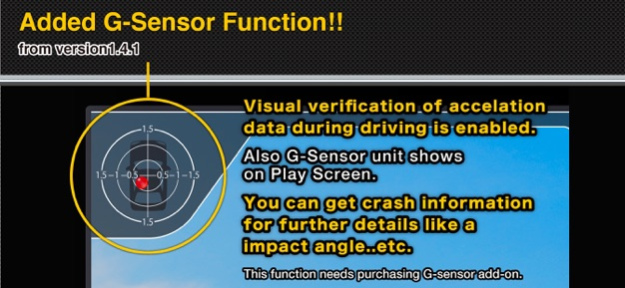

MultiEDR is a Event Data Recorder App that starts recording by sensing a shock and records for 1 minute both before and after a shock. It saves on speed, distance and route during driving. It is useful for checking the date and driving conditions in the event of an accident.
----------
Feature1. Records before and after shock!
----------
MultiEDR can sense the shock during the drive by using the acceleration sensor of iPhone, and record both one minute before and after the shock.
*If recording fails to start during shock, it can be started manually on Emergency Mode.
----------
Feature2. Design!
----------
MultiEDR was developed by leading professional designer of automotive display device. Display layout makes it easy to understand functions, and simple design allows a good field of view to ensure safe driving.
----------
Feature3. Shows Twitter!
----------
MultiEDR can get timeline of your account and shows tweets one by one. (iOS5.0 is required when using Twitter.)
*Do not use Twitter function when driving.
----------
Feature4. Auto screen OFF (Eco mode)!
----------
When display is not touched for a period of time, it automatically shuts off screen, thereby decreasing battery consumption.
- Movie Quality(Size) : Movie size of 1 hour.
- Highest Quality : About 9.0 GB
- High Quality1 (1280x720) : About 4.5 GB
- High Quality2 (640x480) : About 1.5 GB
- Middle Quality (480x360) : About 0.3 GB
- Low Quality (192x144) : About 0.06 GB
*For long recording, we recommend middle quality.
[Function List]
+++ Records Function
- Automatic Records by sensing the shock.
- Manual Recording (Continuous)
- Emergency mode
- Can select Video Quality High/Medium/Low
- Can take and save pictures.
- Recording audio
- Auto screen OFF
- Stops recording automatically when free space of Disk is 1GB and less.
- Stops recording automatically when the power is 10% or less.
+++ Display items
- Tweet
- Map(showing route)
- Speed Meter
- Recording time
- Driving distance
+++ Save Info
- Video
- Pictures
- Recording Date
- Video Size
- Driving Route, Time, Distance
- Average Speed, Maximum Speed
- Value of the shock and speed of time for device to sense shock
* Caution!! *
- Recording performance may be impaired in some environments or conditions.
- This application consumes considerable power, particularly for obtaining location information, so connection with a charge cable is recommended during use.
- Due to the simultaneous operation of process ( video recording, obtaining location,etc.) device may heat up.
- When a call or mail received, recording is stopped and saved automatically.
- Navigation can be used by device of iPhone4 or higher.
* You are responsible for your own road safety when using this device while driving.Our company does not assume responsibility for accidents caused by its operation while driving.
[App Support]
http://multidriverecorder-english.blogspot.com/
Jun 3, 2020
Version 1.4.17
iOS13 Optimized:
Fixed Twitter/ Dropbox function.
About MultiEventRecorder
The company that develops MultiEventRecorder is KYOWA Engineering Laboratory, Inc. The latest version released by its developer is 1.4.17.
To install MultiEventRecorder on your iOS device, just click the green Continue To App button above to start the installation process. The app is listed on our website since 2020-06-03 and was downloaded 0 times. We have already checked if the download link is safe, however for your own protection we recommend that you scan the downloaded app with your antivirus. Your antivirus may detect the MultiEventRecorder as malware if the download link is broken.
How to install MultiEventRecorder on your iOS device:
- Click on the Continue To App button on our website. This will redirect you to the App Store.
- Once the MultiEventRecorder is shown in the iTunes listing of your iOS device, you can start its download and installation. Tap on the GET button to the right of the app to start downloading it.
- If you are not logged-in the iOS appstore app, you'll be prompted for your your Apple ID and/or password.
- After MultiEventRecorder is downloaded, you'll see an INSTALL button to the right. Tap on it to start the actual installation of the iOS app.
- Once installation is finished you can tap on the OPEN button to start it. Its icon will also be added to your device home screen.
Program Details
System requirements
Download information
Pricing
Version History
version 1.4.17
posted on 2020-06-03
Jun 3, 2020
Version 1.4.17
iOS13 Optimized:
Fixed Twitter/ Dropbox function.
version 1.4.13
posted on 2012-04-23
Disclaimer
Official App Store Link
We do not host MultiEventRecorder on our servers. We did not scan it for viruses, adware, spyware or other type of malware. This app is hosted by Apple and passed their terms and conditions to be listed there. We recommend caution when installing it.
The App Store link for MultiEventRecorder is provided to you by apps112.com without any warranties, representations or guarantees of any kind, so access it at your own risk.
If you have questions regarding this particular app contact the publisher directly. For questions about the functionalities of apps112.com contact us.
